

Product Education Brief: Reveal LINQ Device Clock
Reveal LINQ™ ICMs
Original Date of Communication:
May 2026
View specific models that this applies to
Overview
This Product Education Brief provides a description of Reveal LINQ™ device clock set up at implant and behavior following a reset.
This Product Education Brief is consistent with existing labeling and reiterates instructions and precautions listed in the product’s Instructions for Use (IFU).
Applicable Product
Reveal LINQ (LNQ11)
Details regarding device setup at implant
Reveal LINQ relies on a Device Date/Time clock to save arrhythmia episodes’ time and date and to determine when to connect to a home monitor to send data.
When using the Medtronic CareLink Model 2090 programmer or the CareLink Encore programmer, the implant date must be entered on the Patient Information screen prior to device insertion. Following device insertion, the Device Date/Time must be programmed by navigating to the Quick Look screen, selecting Params, and opening the Device Data Collection window.
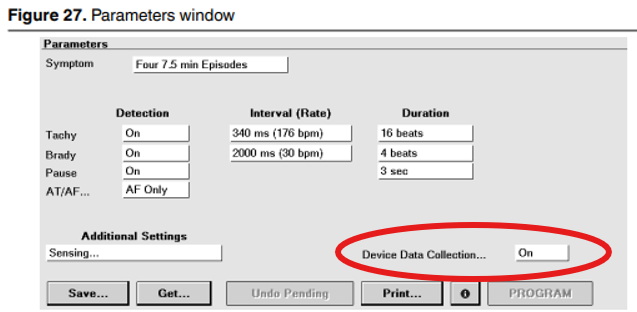
Figure 1: Accessing Device Data Collection window on 2090/Encore to program device clock
When using Reveal LINQ Mobile Manager (LMM), the device implant date automatically defaults to the tablet’s date and time. No additional user input is required.
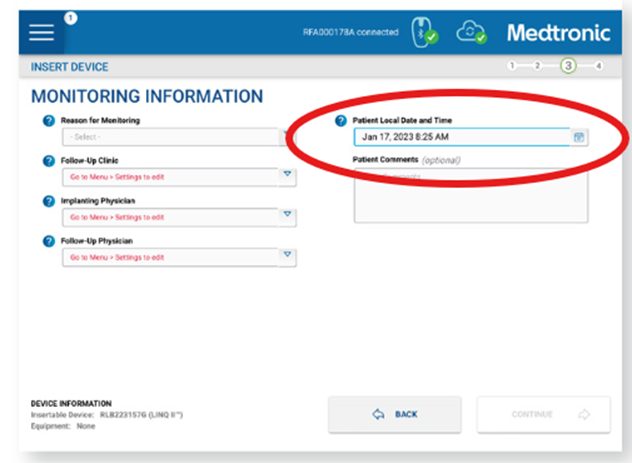
Figure 2: LMM automatically defaults device clock to tablet date and time
The MyCareLink Patient Monitor wirelessly collects data from the device and automatically transmits it, nominally from 00:00 to 05:00 (programmable), to their physician via the CareLink Network. Wireless transmission time programming is based on the device clock.
Details regarding device behavior after reset
Following a device reset, the device clock will reset to 01-Jan-1994 and wireless transmission time will reset to midnight (00:00).
Device resets can be caused by certain conditions including, but not limited: to device malfunction, EMI, electrocautery, or external defibrillation. This can result in the loss of stored data and changes in the settings of some programmed parameters. You will be informed that a reset has occurred by a pop-up message that appears at the start of the next patient session and an alert on CareLink.
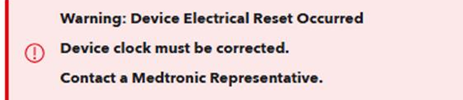
Figure 3: CareLink alert indicating device reset occurred
If you have questions regarding this education brief, please contact Medtronic Technical Services.
References
- Reveal LINQ LNQ11 Insertable Cardiac Monitor and Patient Assistant PA96000 Clinician Manual (US) - M958488A001
- Reveal LINQ Insertable Cardiac Monitor and Patient Assistant PA96000 Clinician Manual (OUS) - M027641C001
- Reveal LINQ Mobile Manager 2.12.x Online Help Instructions for Use (US) - M061918C001
- Reveal LINQ Mobile Manager 2.12.x Online Help Instructions for Use (OUS) - M052084C001
- medtronicacademy.com
Specific Models This Applies To
Methods for Estimating
Contact Us
Worldwide Contact Information